
CMYK Test Page: Print a CMYK Printer Test Page Online
Print a free CMYK printer test page and see in under a minute whether all four of your printer’s inks are working. This CMYK test print page checks cyan, magenta, yellow and black, one large patch per ink, plus the mixed colours, tint ramps and fine lines that show whether the inks are mixing correctly. Use it whenever a colour looks wrong, after fitting a new cartridge, or before an important print run. If you only need to check black, use the Black & White Test Page instead; for a full-colour check with photographs in mind, use the Color Test Page.
Quick answer: print the sheet below and look at the four large patches first. If any patch is missing, streaked or the wrong colour, that cartridge is the problem. Green printing blue, for example, means the yellow ink is missing.
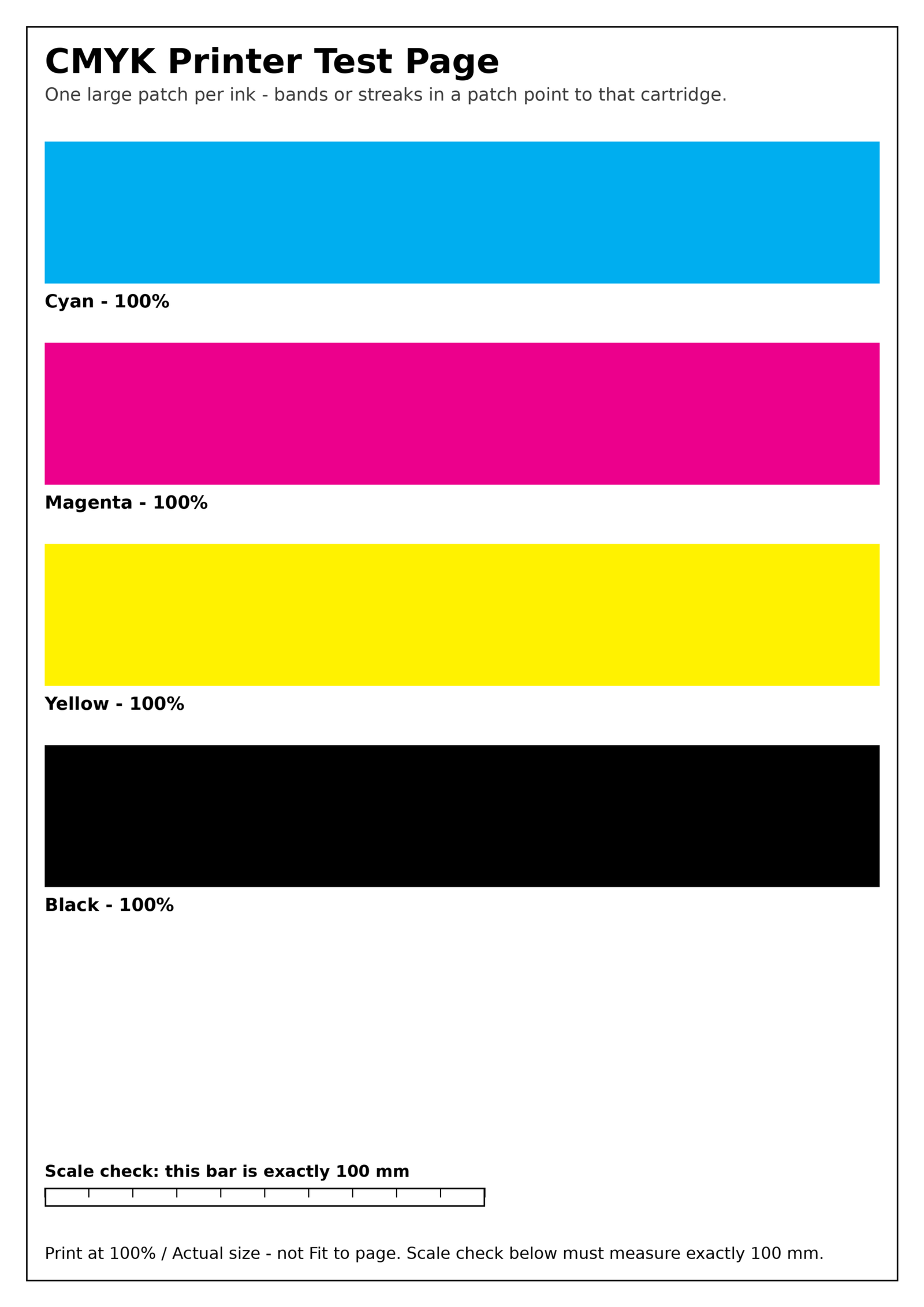
Print at 100% / Actual size. Works with HP, Canon, Epson and Brother, on Windows, Mac, Android and iOS.
What Does a CMYK Test Page Check?
Cyan patch
One large solid cyan patch. If it is missing, streaked or pale, the cyan cartridge or print head is the problem. Clean it, then print the page again.
Magenta patch
One large solid magenta patch. Bands or white lines across it point to a blocked magenta nozzle or a failing magenta cartridge.
Yellow patch
One large solid yellow patch. Yellow is the hardest patch to see, so look closely. A missing yellow patch is the usual reason greens print blue.
Black patch
One large solid black patch, plus black text. It checks the black cartridge, the print head alignment and whether text stays sharp.
The sheet also prints the mixed colours (green, blue, red and orange) so you can see whether the inks mix correctly, plus tint ramps for each ink, a grayscale ladder from white to black, and fine lines in both directions. A 100 mm scale line at the bottom checks that the page printed at the right size, and the fine print in several sizes shows whether text stays readable. If you only need to check black, the Black & White Test Page is the quicker sheet, but a CMYK test print page is the right choice whenever colour is involved.
How to Read Your CMYK Test Page
Printed the page? Match what you see to the fault:
One ink missing
A whole patch is blank. That cartridge is empty or its nozzles are blocked. Replace or clean that cartridge, then print the page again. See our Color Test Page for a sheet that tests all four inks at once.
One ink weak or faded
A patch prints but looks pale or washed out. The cartridge is low, or the nozzles are partly blocked. Run a cleaning cycle for that colour and check the ink level.
Wrong mixes: green prints blue
Mixed colours come out wrong when one ink is missing: green needs yellow, so green printing blue means the yellow is gone; purple printing pink means the cyan is gone. Check the missing ink, then run a nozzle check.
White lines or banding
White stripes across the patches mean blocked nozzles. Run a cleaning cycle, then print a nozzle check page to confirm every nozzle is firing. The full set of sheets is on the Printer Test Page PDF hub.
CMYK vs RGB: Why Printers Use CMYK
Printers use CMYK, which is cyan, magenta, yellow and black (K), because they print by putting ink on paper. Each ink absorbs some of the light that hits the page, so layering cyan, magenta and yellow absorbs more light and makes darker colours. Black (K) is added because the three colours together make a muddy dark grey, not a true black, and black ink is cheaper than using all three colours for every dark area.
Screens use RGB (red, green and blue light) which is why the colours on your screen never match the printed page exactly. An RGB screen can show bright, glowing colours that no printer can reproduce, and the same image can look different on two screens. That is normal: a CMYK test print page shows you what the printer can actually do, in the inks it actually uses. If a colour on screen looks different on paper, print this page first. If the patches are right, the printer is fine and the difference is the screen.
When Should You Print a CMYK Test Page?
Print a CMYK test page whenever a colour looks wrong: a photo with a colour cast, a chart whose colours have shifted, or a document where one colour has gone missing. Print one after fitting a new cartridge, after the printer has sat unused for a few weeks, after a paper jam or a move, and before any important print run. It is also the fastest way to prove whether a fault is in the printer or in the file: if the CMYK patches are right, the printer is fine and the problem is in the document or the app.
How to Print a CMYK Test Page
Online, in your browser
The fastest way to print a CMYK test page is right here: click ‘Print CMYK Test Page (A4)’ above and print the PDF from your browser. Print at 100% / Actual size on plain paper, with the quality set to Normal or Best. The US Letter version is the same sheet sized for North American paper.
On Windows 11 & 10
Windows 11: open Settings > Bluetooth & devices > Printers & scanners, click your printer, then choose Print test page. Windows 10: open Settings > Devices > Printers & scanners, click your printer, then Manage > Print a test page. Or open Control Panel > Devices and Printers, right-click your printer, choose Printer properties, then Print Test Page. To print a CMYK test page from Windows that checks all four inks, use the sheet above. The built-in Windows test page only prints black text and a small colour logo.
On a Mac
macOS has no single built-in CMYK test page. The simplest way is to open the PDF above in Preview, choose your printer, set the scale to 100%, and print. That tests the printer, the driver and the connection in one go, in all four inks.
From the printer’s control panel
Most printers can print their own test page from the control panel: on HP printers, open Setup > Reports > Print Quality Report; on Brother inkjets, press Ink > Improve Print Quality > Check Print Quality; on Epson printers, use the Maintenance menu. For the full steps for your brand, see our HP printer test page, Canon printer test page, Epson printer test page and Brother printer test page guides.
CMYK Test Page FAQs

Louis Burton
Louis Burton has spent more than 10 years working with printers, and he still enjoys it. He runs his own printing shop in Pensacola, Florida, where he prints, services and troubleshoots inkjet and laser printers from HP, Canon, Epson and Brother every day. Louis started Printer Test Page to share the test sheets and checks he uses in the shop, so anyone can find out in one minute whether a printer is healthy or exactly which part of it needs attention.